

Indira Gandhi National Open University (IGNOU) provides students across India with the opportunity to study through distance and online modes. This means that IGNOU allows students to study from the comfort of their homes at their own pace.
Every year, thousands of students register for diplomas, bachelor’s, master’s, and certificate programs. Anyone who wishes to enroll in these courses and take admission in the next session must complete the registration process.
This article guides you about IGNOU Registration Details, such as what registration means, who can apply, what documents you will need, and what happens after you submit the form.
What is IGNOU Registration
IGNOU registration is the first step to filling out an online form to join any course offered by the university. It means creating an admission account, selecting a programme, and submitting the required details and documents.
After registration is approved, you receive an enrollment number. With this number, you or students can check their admission status, download study material, submit assignments and exam and appear in exams.
Who Can Apply or Register for IGNOU
Registration is open to:
- Students who have passed Class 12 (for UG programmes)
- Graduates applying for a master’s degree
- Working professionals and homemakers
- Learners who want to upgrade skills through certificate programmes
- There is no age limit for any IGNOU course.
IGNOU Courses Available for IGNOU Registration
IGNOU offers many programmes, including:
- Diploma and certificate courses
- Bachelor programmes such as BA, BCom, BBA, BCA, and BSc
- Master’s programmes such as MA, MCom, MBA, MCA and MSc
- PG Diploma and skill-based courses
The complete programme list is available on the official IGNOU Portal.
IGNOU Registration Process: How to Register for IGNOU
Here is the online new registration process. Last date for submission of Application: 31st January 2026.
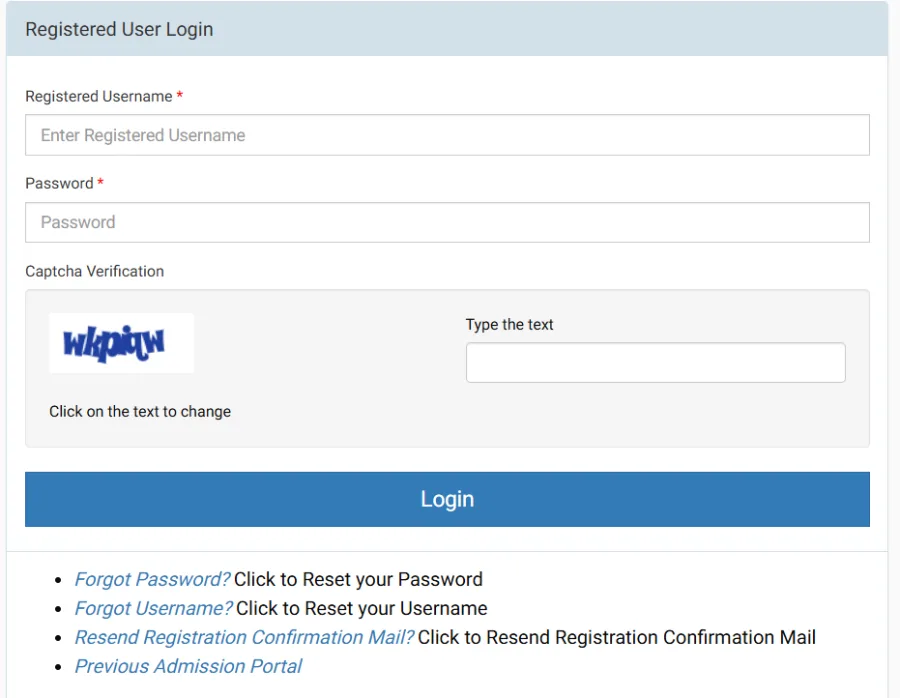
- Visit the official website: https://ignouadmission.samarth.edu.in
- Click on “New Registration”
- Create an account using your mobile number and email ID.
- Login your Account and select the programme you want to join.
- Fill up personal, academic and contact information.
- Upload scanned documents, which are required.
- Pay the registration fee online
- Download the confirmation slip for future use
After submission, students can track their admission status from the same portal or their registered email.
IGNOU Registration Documents Required
You must upload clear, scanned copies of your document that help to approve your IGNOU admission and Registration.
| Document Name | Who Needs It? | File Format | Size Limit |
| Passport Size Photograph | All Students | JPG / JPEG | < 100 KB |
| Scanned Signature | All Students | JPG / JPEG | < 100 KB |
| Age Proof (10th Marksheet) | All Students | JPG / PDF | < 200 KB |
| Educational Documents (12th/Graduation) | All Students | JPG / PDF | < 200 KB |
| Experience Certificate | Only for Professional Courses (MBA, etc.) | JPG / PDF | < 200 KB |
| Category Certificate | SC / ST / OBC Candidates (for reservation) | JPG / PDF | < 200 KB |
| BPL Certificate | Below Poverty Line Candidates (for fee waiver) | JPG / PDF | < 200 KB |
| ABC / APAAR ID | Mandatory for All (New Requirement) | 12-Digit Number | N/A (Enter Code) |
The files must be in the size and format specified here and on the IGNOU portal.
IGNOU Registration Fee & Payment Details (2026)
Here is the list of registration fees and Payment details for IGNOU Admission for each programme.
| Category | Fee Amount |
| Registration Fee (General) | ₹300 (Non-Refundable) |
| Registration Fee (Professional) | ₹1,000 (e.g., B.Ed, BSc Nursing) |
| International Students | Varies (Calculated in USD/INR) |
| Payment Modes | Credit/Debit Card, Net Banking, UPI (BHIM/GPay) |
Cancellation & Refund Policy:
| Time of Cancellation | Refund Amount |
| Registration Fee | No Refund (Under any circumstance) |
| Before Admission Confirmation | Full Programme Fee Refund |
| Within 15 Days of Confirmation | Programme Fee minus ₹500 |
| 16 to 90 Days of Confirmation | Programme Fee minus ₹1,000 |
| After 90 Days | No Refund |
IGNOU accepts payments through UPI, debit cards, credit cards, and net banking. A one-time registration fee is also added.
IGNOU Admission Cycles for 2026
IGNOU accepts registration in two sessions:
- January session
- July session
Deadlines are often extended, but applying early ensures there are no delays with books and assignments.
How to Check IGNOU Registration Status
- Visit the official IGNOU Admission portal: ignouadmission.samarth.edu.in.
- Login your Account with your email and password.
- Click on Check My Application Status.
If approved, your enrollment number will be shown, along with some details.
Alternatively, you can check the Application status through the official link with your Enrollment Number and program code. If you want to check your course details, validity, or Re-registration status:
What Happens After Registration
Once you receive your enrollment number, you can:
- Download your student ID card
- Get e-books from online sources
- Get a hard copy from the IGNOU study centre or the Regional Centre.
- You will need to submit your assignments when the exams are held.
- Apply for term-end exams (TEE)
- You can access updates from the student dashboard.
All students should ensure they keep their enrollment number safe, as they will need it throughout the entire course.
Final Word
Registering on IGNOU is easy if you keep your documents ready and follow the online steps provided. The university offers the opportunity to study from anywhere in India. Fill in your details accurately, check your application status regularly, and keep your login credentials secure.
If you like this Information, please join our Telegram and whatsapp channel, YouTube channel, and Necessary Groups for more IGNOU Updates.