

Indira Gandhi National Open University (IGNOU) has released the hall tickets for the December 2025 Term End Examinations for the e-VidyaBharati (Tele-education) project. The wait is finally over for international students.
Unlike regular domestic students who attend physical study centres, students enrolled under the e-VidyaBharati (Pan-Africa e-Network) project often have different examination procedures, including online, remote proctored exams.
Here is a direct link to download your admit card and important instructions on how to appear for the examination from your country.
How to Download IGNOU E-VidyaBharti Hall Ticket Dec 2025
Here is the official Hall ticket download link to check your IGNOU E-VidyaBharti Admit Card.
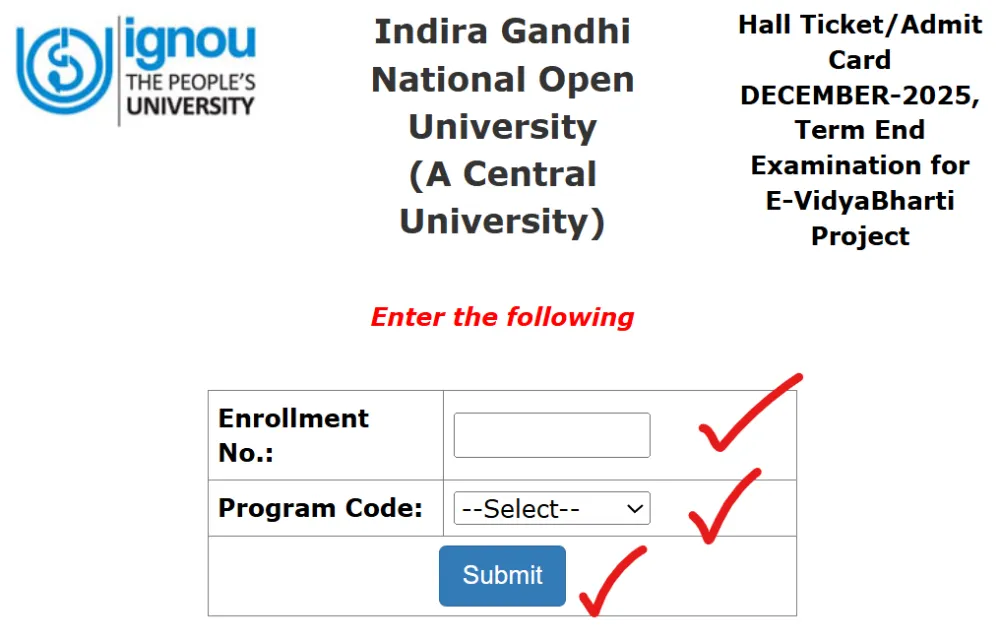
- Official Link: Click on the given direct link provided below.
- Enter Enrollment Number: Type your Enrollment Number.
- Select Program: Choose your specific program code from the dropdown list.
- Submit: Click on the “Submit” button.
- Print: Finally, your Hall Ticket/Admit Card will appear on your screen. Save it as a PDF immediately and take a printout for reference.
Direct Link to Download
Download E-VidyaBharti Hall Ticket (Dec 2025) (Click here to access the official portal for IGNOU E-VidyaBharti admit Card Dec 2025 )
What you Should Check on the Hall Ticket/Admit Card
After downloading your IGNOU E-VidyaBharti Admit Card, make sure the following details are correct:
- Your name
- Enrollment number
- Programme name
- Exam centre name and code
- Course codes with exam dates and time
- Reporting time and instructions
If anything is incorrect, you contact the helpdesk immediately.
Exam Instructions for E-VidyaBharti Students
The IGNOU e-Vidya Bharati exam is strictly monitored. Since you will be taking this exam from outside India, you need to pay attention to three main points.
Check the Time Zone (Most Important):
The time printed on your hall ticket or admit card is usually in Indian Standard Time (IST). Don’t mistake this for your local time. You will need to convert the IST time to your country’s local time.
Example: If your exam is at 10:00 AM IST, and you are in Ghana, you need to check what time that is in Ghana to ensure you log in at the right moment.
Exam Mode:
- Most e-VidyaBharati exams are conducted online.
- You will take the exam on a laptop or desktop computer.
- You must have a working webcam and microphone.
- The system will monitor your activity and make sure you are sitting alone in a quiet room.
- You will need to log in to a specific exam portal (usually ievb.ignouonline.ac.in or as indicated on your hall ticket).
Login Credentials:
- To log in to the exam portal (usually ievb.ignouonline.ac.in), you will need a specific username and password.
- These details are often sent to your registered email address or are included in the instructions on your hall ticket. Make sure to have them ready at least 30 minutes before the exam begins.
Customer Support for IGNOU E-VidyaBharti Hall Ticket
If you have submitted the form and paid the fees but are still not receiving your ticket, please contact the E-VidyaBharti support team immediately.
- Email: evb@ignou.ac.in or support.evb@ignou.ac.in
- CC: Your specific Regional Director or Coordinator.
Final Word
All e-VidyaBharati students can now download their December 2025 IGNOU e-Vidya Bharati admit cards or hall tickets immediately. Please check your login credentials. Don’t wait until the last minute. Make sure your webcam is working, and remember to convert the exam time to your local time zone.