

Has your semester started, but your books (study material) haven’t arrived by post yet?
Don’t worry. You don’t need to wait for the postman. The Indira Gandhi National Open University (IGNOU) has an official mobile application called “IGNOU e-Content” that allows you to access your complete syllabus digitally.
In this guide, we will tell you everything you need to know about this app and how to find your specific course material inside it.
What is IGNOU e-Content App?
The IGNOU e-Content App is a digital library app provided by IGNOU University. It serves soft copy – PDF handy alternative to physical books. Whether you are pursuing a Bachelor’s degree like BA or B.Com, a Master’s degree like MA or MCA, MSCIS, or even a short-term Diploma, this app contains the PDF versions of the study material for almost all programs.
The best part is that it is completely free to use. You do not need to pay any subscription fee, nor do you need to log in with your credentials. It is designed to be a simple “open and read” platform for students.
App Highlights:
- Cost: 100% Free.
- Developer: IGNOU Official.
- Size: Very lightweight (approx 5-10 MB).
- Offline Mode: You can download chapters and read them without the internet.
Where to Download the IGNOU e-Content App
For Android users
The app is primarily available on the Google Play Store. You can simply search for “IGNOU e-Content” and look for the official university logo. Tap to install it.
Note: Currently, you cannot download an Ignoucontent App on your device from the Google Play Store. Because it is removed.
There, you can join our Telegram or Whatsapp channel for Downloading the IGNOUeContent APK.
For iOS (iPhone) Users:
Currently, the app may not be available or updated on the App Store. iPhone users are recommended to use the eGyanKosh website directly.
For iPhone users, the app might not always be updated or available on the Apple App Store. If you use an iPhone or iPad, it is better to skip the app and directly visit the eGyanKosh or IGNOU website through your Safari browser for study material.
How to Use the IGNOU e-Content App
When you open the app for the first time, you can see the logo and courses listed. Like the image below.
Follow these simple steps to find your specific subject:
Open the App: You do not need to login or enter an enrollment number.
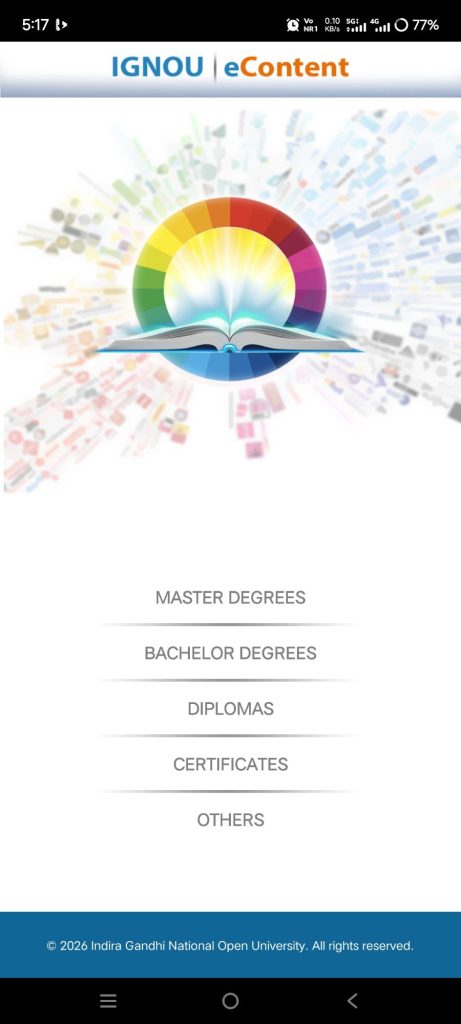
Select Level: Choose your course level:
- Master’s Degree
- Bachelor’s Degree
- Diploma / Certificate
- Certificates
- Others
Find Your Program: Scroll down to find your program code (e.g., my course is MSCIS). Also, you can search for your course.
Select Subject: Click on the specific subject code (e.g., MSEI-021).
Download Blocks: You will see the study material divided into “Blocks”. Click on any block to open the PDF. You can download the PDF or read it on the app easily.
- Tip: Long-press the file to download it for offline reading.
Common Issues You Might Face
If you’re facing a little glitch, the screen goes blank or black. Here is how to fix common problems:
- The screen goes blank or black: This usually happens if your internet connection is unstable when the app tries to load the list of books. Try switching from mobile data to Wi-Fi, or close the app and open it again.
- I cannot find my course: IGNOU frequently launches new courses, especially under the new four-year degree programs. If your specific course is not listed in the app yet, do not worry. It simply means the app hasn’t been updated. In this case, you should visit the eGyanKosh website, where the database is updated much faster.
- The PDF is not opening: The app downloads standard PDF files. To open them, your phone must have a PDF viewer installed. If the file refuses to open, go to the Play Store and install a basic PDF reader like Adobe Acrobat or Google PDF Viewer.
Can You Read This on a Laptop?
Yes, absolutely. You can use this app on a laptop or PC. If you prefer reading on a larger screen, you can access the exact same books on your laptop or desktop.
Simply go to Google and search for “eGyanKosh.” It is the national digital repository used by IGNOU. You can download the same PDFs there without needing to log in.
Final Word
Waiting for physical books can waste valuable study time. We highly recommend keeping this app installed on your phone so you can quickly check a topic or complete your assignments even if you are traveling.
If you like this Information, please join our Telegram and whatsapp channel, YouTube channel, and Necessary Groups for more IGNOU Updates.