
If you have been waiting to start your degree with Indira Gandhi National Open University (IGNOU), here is some great news: the admission portal is still open.
As of October 2026, IGNOU has extended the final deadline for the July 2026 fresh admission cycle to 13th October 2026 for most programs. However, there is a new rule you need to know about before you start filling out the form: you must have an APAAR ID ready.
Whether you are aiming for a Bachelor’s, Master’s, or Diploma, this simple, step-by-step guide will walk you through the exact process, document requirements, and common mistakes to avoid so your application goes through smoothly.
IGNOU Admission Overview 2026
| Detail | Current Status |
|---|---|
| Active Session | July 2026 Cycle |
| Final Last Date | 13th October 2026 (for most programs) |
| Official Portal | ignouadmission.samarth.edu.in |
| New Mandatory Rule | APAAR ID is now required to register |
| Payment Modes | UPI, Net Banking, Debit/Credit Card |
Important Note: Certificate and semester-based programs sometimes have different, earlier deadlines. Always double-check your specific course on the portal before paying.
What is an APAAR ID?
Before clicking on “Register,” you need to know about the APAAR ID (Automated Permanent Academic Account Registry). This is an initiative by the Government of India aimed at providing every student with a unique, lifelong academic ID.
The IGNOU portal now explicitly asks for this information. If you do not have it yet, you can create it immediately via the official APAAR website. Keep this ID safe, as you will need to enter it during the IGNOU registration process.
Who Can Apply? (Eligibility Requirements)
The best part about IGNOU? There is no upper age limit for most courses.
- Certificate Programs: Must have passed 10th or 12th.
- Bachelor’s Degrees (BA, BCom, BCA, BBA, etc.): Must have passed 12th (10+2).
- Master’s Degrees (MA, MCom, MSc, etc.): Must hold a recognized Bachelor’s degree.
- MBA & PG Diplomas: Bachelor’s degree + minimum 3 years of managerial work experience.
Note: If you are appearing for your final board/graduation exams in 2026, you can apply provisionally, but you must submit the passing certificate later.
Required Documents and Strict File Sizes
The IGNOU portal will reject your application if your files are even 1 KB over the limit. Prepare these exact soft copies before you start:
| Document | Format & Strict Size Limit | Key Rules |
|---|---|---|
| Photograph | JPEG, Under 100 KB | Recent, color, plain white background. No glasses or caps. |
| Signature | JPEG, Under 100 KB | Signed on plain white paper with a black/blue pen. |
| Marksheets & Degrees | JPEG or PDF, Under 200 KB | 10th, 12th, and Graduation certificates. |
| Category Certificate | JPEG or PDF, Under 200 KB | Only for SC/ST/OBC-NCL candidates. |
| Experience Certificate | JPEG or PDF, Under 200 KB | Only required for MBA/Work-ex programs. |
| APAAR ID | Mandatory | Your 12-digit government academic ID. |
Step-by-Step: How to Apply for IGNOU Online
The Samarth portal might seem a bit complicated, but if you follow these steps, you can get the job done in about 15 minutes.
Step 1: Go to the Official Website: Open your browser and go directly to ignouadmission.samarth.edu.in. You must sure that Never use third-party websites, as they may charge hidden fees or steal your data.
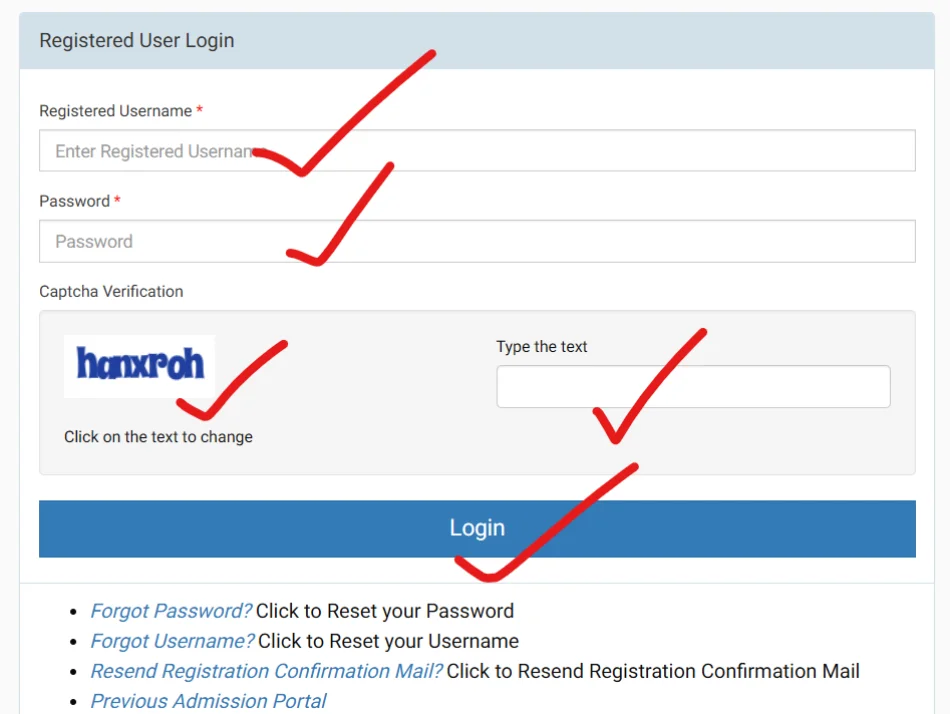
Step 2: Create a New Account: Click on the “NEW REGISTRATION” button. You will need to provide:
- Your full name
- A valid, active email address
- An active mobile number
You will receive an OTP on both your email and phone to verify them. Make sure you use your own contacts, not a cyber cafe’s.
Step 3: Fill in Your Details: Log in with your new username and password.
- Select your desired program from the list.
- Programme name
- Programme code
- Eligibility
- Duration
- Fee
- Study mode
- Regional/study centre details
- Programme-specific requirements
- Carefully read the eligibility criteria and fee structure.
- Fill in your personal, academic, and address details exactly as they appear on your official documents.
Step 4: Upload Your Documents: Most applications get stuck at this stage. The portal is very strict regarding file sizes. Have these files ready before you begin:
- Photograph: Clear, color, passport-size with a white background (under 100 KB, JPEG).
- Signature: Scanned signature on white paper (under 100 KB, JPEG).
- Educational Certificates: 10th, 12th, or Graduation marksheets (under 200 KB, JPEG or PDF).
- Category Certificate: SC/ST/OBC-NCL, if applicable (under 200 KB, JPEG or PDF).
- Experience Certificate: Only required for specific courses like MBA (under 200 KB).
Step 5: Pay the Fee: Review your form using the “Preview” option. Once you are sure everything is correct, proceed to payment. The portal accepts UPI, Net Banking, and major Debit/Credit Cards.
- Tip: You must ensure that please do not refresh or close the page until you see the “Payment Successful” screen.
Step 6: Save Your Confirmation: After payment, a confirmation page with your application number will appear. Download and print this immediately. This is your proof of application until your official enrollment number is generated.
How to Check IGNOU Admission Status?
Students can follow these basic steps:
- Visit the official IGNOU admission status facility.
- Enter your enrolment number.
- Select or enter the programme code, as required.
- Submit the details.
- Check the admission information displayed on the screen.
If there is a problem with the application or status, students should use the official IGNOU support or contact their concerned Regional Centre.
Understanding the IGNOU Refund Policy
Life happens, and sometimes you might need to cancel your admission. IGNOU has a clear, automated refund policy. You can request this directly from your applicant login (do not send emails or iGRAM requests for this).
- Before admission is confirmed: You will get a refund of your program fee, but the initial Registration Fee is non-refundable.
- After admission is confirmed: IGNOU will deduct 15% of the program fee (up to a maximum of ₹2,000) as a processing charge before refunding the rest.
- Digital Material Users: If you chose “Soft Copy” for your study materials, only the Registration Fee is deducted.
- Hard Deadline: No refunds are given after 60 days from the official admission closing date.
Frequently Asked Questions (FAQs)
Is the IGNOU admission portal really still open?
Yes, the university has extended the deadline for most Open and Distance Learning (ODL) programs to October 13, 2026. However, since seats might fill up and the portal could crash on the last day, it is better to apply now.
Can I apply for two courses at the same time?
Yes, IGNOU allows you to pursue two programs simultaneously (such as a bachelor’s degree and a diploma), provided their exam schedules do not clash. You will need to fill out two separate application forms and pay the fees for each.
What is the IGNOU Online admission portal?
For programmes offered through the Online mode, IGNOU lists: IGNOU Online Admission Portal (ignouiop.samarth.edu.in)
Final Words
The extension of the deadline to October 13, 2026, is a great opportunity for students who had fallen behind in preparing their documents. Do not wait until the final 48 hours. The Samarth portal experiences heavy traffic as the deadline approaches, often leading to payment failures or session timeouts. Gather your documents, keep your APAAR ID ready, and complete your application calmly and confidently.