

Important: Your IGNOU assignment can be REJECTED if the front page is missing or incorrect. The evaluator needs your details clearly visible to enter marks in the system.
If you are preparing for the IGNOU Assignment, the IGNOU Assignment Front Page is very important for all students. Every IGNOU student is required to attach a cover page to all their assignments before submitting them. This cover page is essential because it contains your personal and course details. It helps the evaluator quickly identify the student (Enrollment Number or Course Code) and subject without having to look inside the file. If the front page is missing or incomplete, the assignment may be delayed or returned.
This article explains the correct front page or cover page format for the IGNOU Assignment Front Page Format, how to download the PDF, and what a completed simple Filled Example so you can submit your work without any errors.
What is an IGNOU Assignment Front Page?
The IGNOU front page is the first page attached to a handwritten assignment. It contains the student’s details, course information, and study centre details. It is mandatory for all programs, including undergraduate, postgraduate, certificate, and diploma courses.
For example, I am a student of IGNOU MSCIS (Master of Science in Information Security), and I need to add an IGNOU assignment front page.
Download IGNOU Assignment Front Page PDF
Friends, you don’t need to buy expensive, colourful files from any market. Because IGNOU prefers a simple, clean white A4 sheet with your details clearly written on it.
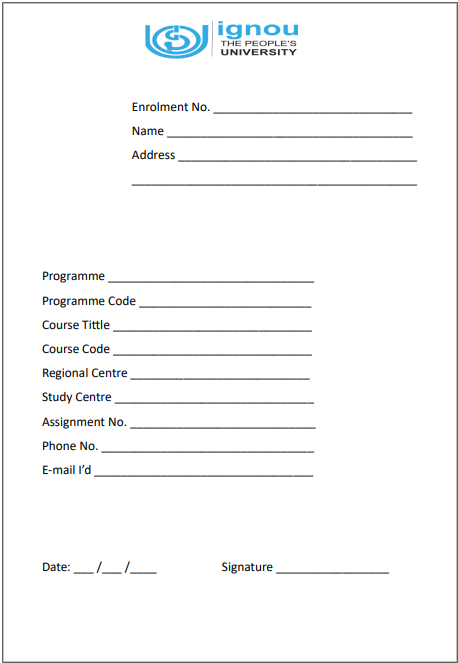
You can download the print Download IGNOU Assignment Front Page PDF format that is accepted at all study centres.
[Click here to download the front page PDF] (Note: You can link your Google Drive file here)
Or, if you create your own (text format)
If you don’t have a printer, don’t worry. You can take a plain A4 sheet and clearly write the details given below using a black or blue pen. This will be 100% accepted.
Required Details:
- Programme Code: (e.g., MSCIS, BAG, MCOM, MEG)
- Course Code: (e.g., BEVAE-181)
- Course Title: (e.g., Environmental Studies)
- Assignment Code: (e.g., BEVAE-181/TMA/2025-26)
- Study Centre Code: (e.g., 07162)
- Name: _______________________
- Enrollment No: _______________________
- Mobile No: _______________________
- Date of Submission: _______________________
- Signature: _______________________
Read More: IGNOU Current Assignment Question Paper
How to Fill the Front Page (With Example)
Many students get confused between “assignment code” and “course code.” Entering the wrong code can result in your marks being updated for the wrong subject.
Here is a simple table to help you fill it correctly:
| Programme Code | MSCIS |
| Course Code | MHD-01 (The specific subject you are solving) |
| Course Title | MSCIS (Master of Science in Information Security) |
| Assignment Code | MSEI-021 |
| Study Centre Code | 0500: IGNOU REGIONAL CENTRE PATNA LSC Code 0500 |
| Enrollment No | 250XXXXXXX (Your 9 or 10-digit roll number) |
Please note: Always provide your current mobile number. If the study center staff misplaces a page or finds any errors, they will call you. If your number is incorrect, they will reject the application.
Can the first page of the IGNOU Assignment be typed?
Yes, you can type the cover page or first page on a laptop or phone and print it. However, the answers to your assignment questions must be handwritten.
Correct Order to Arrange Your Assignment File
Don’t just stuff the papers into a plastic stick file. IGNOU evaluators prefer a specific sequence.
Arrange your pages in this order (Top to Bottom):
- The Front Page: (Filled with your details).
- IGNOU ID Card: (Attach a photocopy for safety).
- The Question Paper: (Printout of the question paper you solved).
- Your Answers: (Handwritten sheets).
Binding tip: Use a simple tag (string) to bind the papers together. Avoid using plastic covers, as many study centers are now “plastic-free zones” and may ask you to remove the cover before submission.
Tips for Submitting IGNOU Assignments 2026
Follow these best practices for submitting your assignments:
- Write your assignment neatly and clearly.
- Attach a cover page with each subject.
- Use good-quality paper.
- Submit your IGNOU assignments before the deadline.
- Keep a scanned copy or photocopy of your work.
- Use a thread instead of staples to bind multiple pages.
Where to Submit IGNOU Assignments
- Assignments are usually submitted at the student’s study centre.
- Some regional centres also allow online submission.
- Always check your regional centre’s notice before submitting.
- Also, follow their Telegram and WhatsApp channels for updates.
Frequently Asked Questions (FAQ)
Is a printed front page mandatory?
No, a Handwritten front page is perfectly fine, provided it is neat and legible.
Do I need a separate front page for every assignment?
Yes, if you have 4 subjects, you will need to create 4 separate assignment files, each with its own front page.
Can I use a red pen on the front page?
No, always use a blue or black pen for your details. Do not use a red pen, as it is only for the examiners (teachers).
Where can I find my Study Centre Code?
You can find your Study Centre Code on your IGNOU admission status page or on your student ID card.
Final World
The IGNOU assignment front page might seem like a small detail, but it’s crucial for every IGNOU student. Filling it out correctly ensures proper evaluation and faster result processing. Download the front page, carefully fill in your details, and attach it to each of your assignments.