

IGNOU Re-Registration is an important process for students who are already enrolled in a programme at Indira Gandhi National Open University and want to continue their studies in the next semester or academic year.
Unlike fresh admission, re-registration is meant for existing IGNOU students. Students need to select the courses for the upcoming semester or year and pay the applicable fee through the official re-registration portal.
For the July 2026 session, IGNOU opened the re-registration process earlier this year. The university later extended the deadline, and the official portal currently records September 30, 2026, as the last date with a late fee of ₹200.
Since this deadline has passed, students should check IGNOU’s official website and the re-registration portal for any further information or the next re-registration cycle.
IGNOU Re-Registration 2026 Latest Update
The latest official update is for the July 2026 re-registration session. According to the IGNOU re-registration portal, the last date for re-registration for all applicable programmes was extended up to September 30, 2026, with a late fee of ₹200. The extension applied to programmes offered in ODL and Online mode.
IGNOU Re-registration July 2026 – Highlights
| Particular | Details |
|---|---|
| University | Indira Gandhi National Open University |
| Process | Re-Registration |
| Session | July 2026 |
| Mode | Online |
| Programmes | ODL and Online |
| Last Date | September 30, 2026 |
| Late Fee | ₹200 |
| Official Portal | onlinerr.ignou.ac.in |
| Current Status | Latest announced deadline has passed |
Students should always check the official portal before making a payment because IGNOU can change deadlines through official notices.
Who needs to complete IGNOU re-registration? (Am I eligible?)
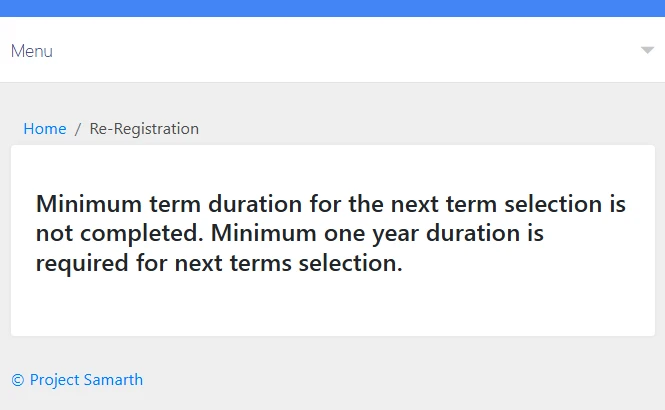
If you are a student pursuing a master’s degree (MSCIS, or other), a minimum period of one year is required before you can register for courses in the next term. You can see this in the image provided below.
This is the most common question. You MUST re-register if:
Re-registration is only for existing students who are continuing their studies. If you fall into any of these categories, you must complete this process:
- Bachelor’s Degree (Annual Mode): You enrolled in your 1st year in January 2026 and are now moving to your 2nd year.
- Bachelor’s Degree (Annual Mode): You re-registered for your 2nd year in January 2026 and are now advancing to your 3rd year.
- Semester System (e.g., BCA, MCA, MBA, BSc): You enrolled or re-registered for the July 2025 or January 2026 session, and now you are moving to the next semester.
- Master’s Degree (Annual Mode): You enrolled in your 1st year in January 2026 and are now moving to your final year.
Please note: You don’t need to wait for last year’s results or assignments. Even if you failed a subject, you can still move on to the next year.
How to Fill IGNOU Re-registration Form 2026 (Step-by-Step)
To apply for the IGNOU Re-registration form 2026, you must follow these original methods.
Step 1: Visit the official portal:
- Go to the official Re-registration portal: https://onlinerr.ignou.ac.in.
- Check this – https://ignou.samarth.edu.in/index.php/site/login
Step 2: Accept Terms and Conditions:
- Read the instructions on the screen, check the “I have read and understood” box, and click “Proceed for Re-registration”.
Step 3: Log in to your Account:
- Enter your Enrollment Number and Password.
- Forgot Password? Click “Reset” and get an OTP on your registered mobile/email.
Step 4: Select Course Name:
- On the dashboard, you will see an option for “Re-registration”. Click on it.
- You will need to select your subjects (courses) for the upcoming year.
Tip: Choose “Soft Copy” for study material if you want a 15% fee discount. If you want to download the IGNOU eContent App and the latest information, join our Whatsapp Channel and Telegram.
Step 5: Pay Fee:
- Check your details and pay the course fee using UPI, Debit Card, or Net Banking.
- Do not close the window until you see the “Payment successful” message.
- late fee of Rs. 200/-
Step 6: Print Receipt:
- Once the payment is complete, download the payment receipt. This will serve as proof of your admission for the following year.
Frequently Asked Questions (FAQ)
What is the last date for IGNOU Re-registration in 2026?
The last date for IGNOU re-registration is extend up to 30th September, 2026 with a late fee of Rs. 200.
Can I change my address during Re-registration?
Yes, there is usually an option to update your address and mobile number when filling out the form.
Can I re-register if I haven’t submitted my previous year’s assignments?
Yes, re-registration is separate from your assignment submission status. You can proceed with the registration process for the next year while simultaneously clearing your previous backlogs.
Is the ₹200 late fee applicable to all programs?
Yes, the revised extension window for the July 2026 session carried a standard ₹200 late fee across most UG and PG programs.
Final Words
IGNOU re-registration is a important step for students wishing to continue their current program into the next semester or academic year. This process is completed online via IGNOU’s official re-registration portal.
For the July 2026 session, IGNOU had extended the re-registration deadline to September 30, 2026, with a late fee of ₹200. Since that deadline has passed, students should now keep an eye on IGNOU’s official website and re-registration portal for any new updates.
Students should rely on the latest official notifications rather than older articles, as the university may extend or change re-registration dates.